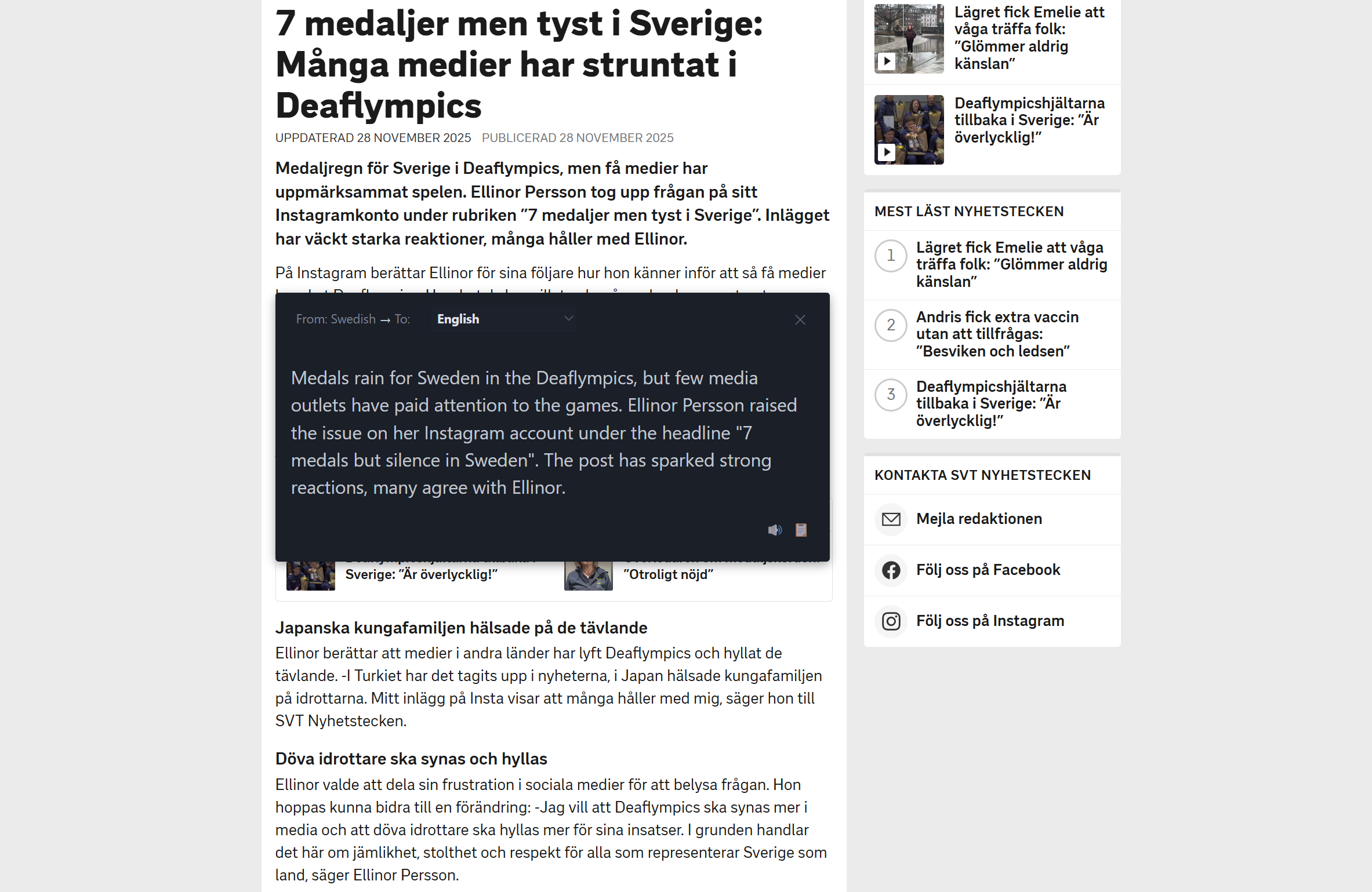
Hi everyone! I almost forgot to announce one of our biggest features… 😅
Translation Pro has actually been live since v6.4.0, and we’re already at v6.4.2! I’ve been working like a machine recently, pushing updates so fast that I forgot to properly introduce this game-changing feature. Better late than never, right?
So let me officially introduce Translation Pro - the powerful text translation feature that’s been quietly revolutionizing language learning for our users.
What’s New with Translation Pro?
Building on the success of our TTS Pro feature, Translation Pro uses the same intuitive interface but for instant translation:
- Select any text on any webpage and get instant translations
- Support for 20+ major languages with accurate AI-powered translations
- Premium Google translation service - superior quality to most providers
- Same convenient bubble interface - just look for the 🌐 icon
- Works everywhere - from news articles to social media posts
Whether you’re learning a new language, reading foreign content, or just curious about what something means, Translation Pro makes it effortless.
Superior Translation Quality
Translation Pro uses Google’s professional translation service - the same technology powering Google Translate Pro. This means you get:
- Higher accuracy than most translation providers
- Better context understanding for natural translations
- Professional-grade quality suitable for serious language learning
- Consistent results across all supported languages
The difference in quality is immediately noticeable, especially for complex sentences and technical content.
How It Works
The user experience is beautifully simple:
- Select text on any webpage (single words, sentences, or paragraphs)
- Press Ctrl (or your configured key) to show the action bubble
- Click the translation icon 🌐 to get instant translation
- View results in a clean, non-intrusive popup
- Click the speaker icon in the translation popup to hear it read aloud!
Just like TTS Pro, Translation Pro uses the same isolated web component architecture that ensures zero interference with the original website.
Perfect for Language Learners
Translation Pro is designed with language learners in mind:
- Learn vocabulary in context - see how words are used in real sentences
- Understand complex texts - translate difficult passages instantly
- Compare languages - great for Swedish learners reading 8sidor or other native content
- Pronunciation practice - translate text, then have the translation read aloud with one click
- High-quality learning - professional-grade translations ensure you’re learning correctly
Technical Excellence & Design
Like all Dictionariez features, Translation Pro is built with quality in mind:
- Open source - you can explore the implementation
- Web Components & Shadow DOM - completely isolated from website scripts and styles
- Auto theme adaptation - automatically adapts to your OS light/dark theme
- Universal compatibility - works on all websites without interference
- Premium Google translation API - professional-grade translation quality
Note: While we’ve tested extensively, if you encounter any website compatibility issues, please let us know so we can improve the experience.
Language Support
Currently supporting 20+ major languages including:
- English ↔ Spanish, French, German, Italian, Portuguese
- English ↔ Chinese (Simplified/Traditional), Japanese, Korean
- English ↔ Russian, Arabic, Dutch, Swedish, Norwegian
- And many more!
Want a language we don’t support yet? Please leave a comment or open an issue - we’re actively expanding language support based on user feedback!
Pricing and Availability
Translation Pro follows our successful TTS Pro model:
🎁 Generous Free Trial
Every user gets a generous free trial to experience the quality of our premium Google translations.
💰 Special Pricing
- Current 11.11 offer: 80% off (ending soon!)
- Third Launch offer: 70% off starting tomorrow
- Full Pro access: Unlimited translations + TTS + cloud sync
Download and Get Started
Ready to break down language barriers? Get started today:
Download Dictionariez:
How to try Translation Pro:
- Install the extension (or update if you’re already a user!)
- Select any text on any webpage
- Press Ctrl to show the action bubble
- Click the 🌐 icon to translate
- Click the 🔊 icon in the translation popup to hear it read aloud
- Upgrade to Pro for unlimited access
The Complete Language Learning Suite
With Translation Pro, Dictionariez now offers a complete language learning toolkit:
- 🔍 Dictionary lookups - Multiple dictionaries in one click
- 🔊 TTS Pro - Natural AI voices read text aloud
- 🌐 Translation Pro - Premium Google translations with audio playback
- 📚 Anki integration - Export words directly to your flashcard deck
- ☁️ Cloud sync - Access your data across all devices
Looking Ahead
Translation Pro represents our commitment to making language learning more accessible and effective. Your support as a Pro user directly funds the development of more AI-powered features and expanded language support.
Ready to experience professional-grade translation? Try Translation Pro today and join the PNL Pro community!
Questions, feedback, or language requests? We’d love to hear from you! Reach out through our community channels or GitHub.
Happy translating! 🌍✨
P.S. Translation Pro and TTS Pro work seamlessly together - translate text to understand it, then have both the original AND translation read aloud for pronunciation practice. The perfect language learning combo!
P.P.S. Yes, I really have been working like a machine lately - v6.4.0, v6.4.1, v6.4.2… more features coming soon! 🤖